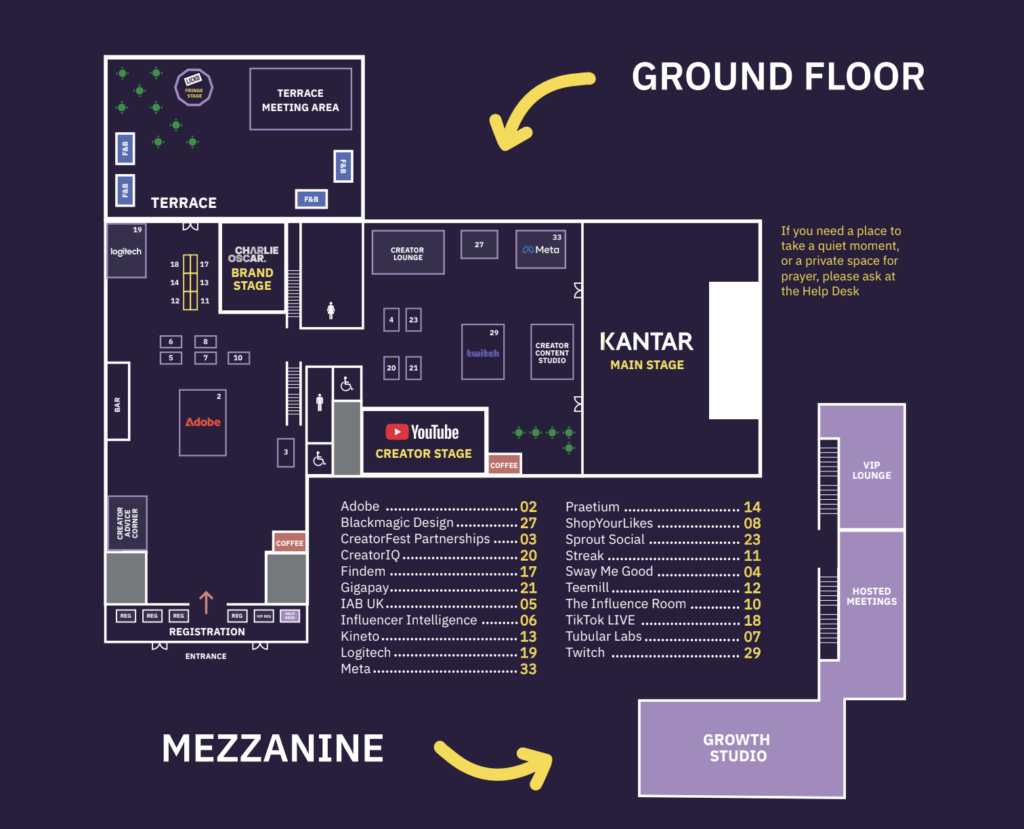
With thousands of meetings taking place across the show, diaries fill up fast. Planning ahead is key to making the most of your time, and a little etiquette goes a long way in ensuring every conversation counts.
The Terrace Networking Area and Creator Content Studio offer bookable tables in 15-minute slots, with the VIP Lounge reserved exclusively for VIPs. All bookings are managed through the CreatorFest App.
Below, you’ll find where to meet, how to secure your slot, and the best practices to help you get the most value from the show.
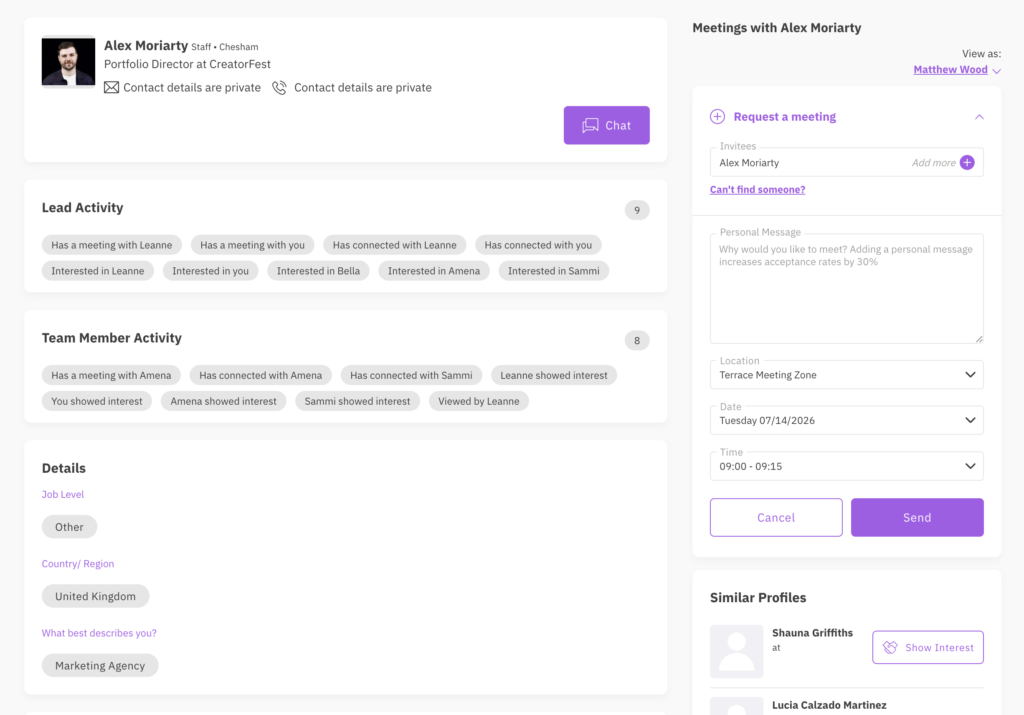
HOW TO BOOK A MEETING
You can quickly arrange and keep a track of all your meetings on the event app.
- Simply go to the Attendees tab, where you can search and find people to connect with. You can chat, connect, and book meetings.
- You will have an option to click on their name to view their profile, Show Interest to connect with them, or Request a Meeting. If requesting a meeting, you will see available date and time slots and locations from which you can pick your preferred option.
- After selecting a slot and choosing a location for the meeting, write a personal message to the person you would like to meet. Once done, click Send.
Then keep an eye on your notifications to find out if the person accepted your meeting. If you no longer need the meeting, please cancel it so the table can be released.
Please note, that meeting requests will be available for up to 7 days. After this time the space will be released and the meeting automatically cancelled if the meeting has not been accepted.
ALLOCATED TABLES
You’ll automatically be allocated a table number once your meeting is accepted. Tables are designed for 2 people to maximise the number of meetings we can accommodate.
Please make sure to arrive on time and leave the spot after your allocated slot, so it’s available for the next meeting.
All of our sponsor and exhibitor stands are also bookable meeting locations if you’d like to connect with them.
MEETING ETIQUETTE
We are working hard to make sure that everybody has a great experience at the show but we also need your help to make sure that everything runs smoothly. Here are some key points and rules to follow.
Check your app notifications and meeting requests – everybody is trying to make the most out of the event, so please respect each other’s time and try to either accept or decline meeting requests as quickly as possible.
Show up – Nobody wants to be stood up – Try your best to attend your accepted meetings and if you no longer can, please cancel it on the app to inform the other party and release the meeting location for others to use.
Arrive and leave on time – schedules are busy, so it’s crucial that both parties arrive at the meeting location on time. It’s especially important if you book a meeting table, as you will have to leave it after your allocated time, ready for the next meeting.
Please make sure to leave the space behind you clean and tidy – If your meeting overruns the zone host may ask you to leave. Please treat them with respect as they are trying to make sure that everybody gets access to their booked space.
MEETING HOSTED VIP RETAILERS
Hosted VIP retailers are part of our CreatorFest Connect programme. While you’ll see them listed in the app and can “show interest” in connecting, you won’t be able to request a meeting directly – their diaries are managed exclusively through the Hosted Meetings scheme.
Of course, retailers themselves can still request meetings with other delegates.
VIP MEETINGS
- Meeting Locations
Bookable tables are numbered. Please only sit at these tables if you’ve booked them for that time slot.
Meetings can also be arranged at any sponsor activation or booth.
The Terrace
Terrace Networking Area (30 tables)
Ground Floor
Creator Content Studio (20 tables)
VIP Lounge
VIP Lounge (20 tables)